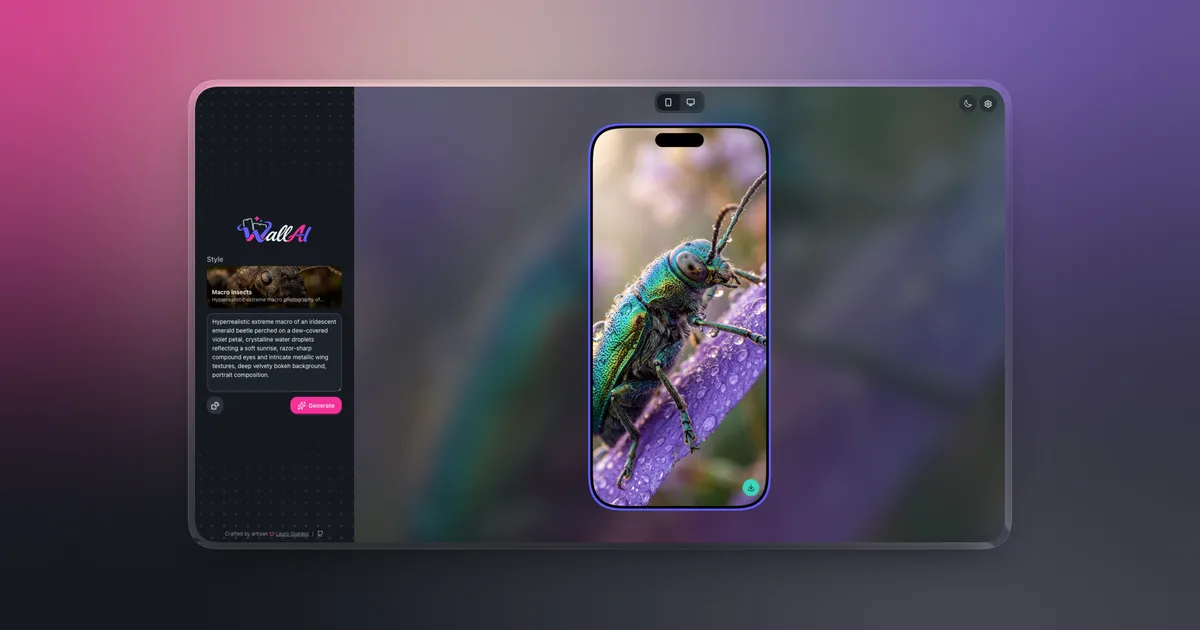
WallAI started as an experiment in AI-assisted wallpaper generation. The first version focused on the generation pipeline: turn a short idea into a detailed prompt, send it to an image model, and return a wallpaper sized for a phone or desktop.
Version 2.1.1 turns that experiment into a project designed to be self-hosted. The application now ships as a multi-architecture Docker image, includes an installation and management CLI, supports authenticated users or private browser workspaces, and can run behind its bundled HTTPS proxy or an existing reverse proxy.
Users can choose from 21 visual styles, write their own description or generate one automatically, preview the result in a phone or monitor mockup, and download the final image. AI providers and models are configured from the application, so each installation can use its own OpenAI, Google, or Ollama setup.
What changed in v2.1.1
The main goal of this release was to make installation predictable. A host only needs Docker Engine and Docker Compose. PHP, Composer, Node.js, and Redis are packaged inside the deployment instead of becoming prerequisites for the operator.
The default installation now takes three commands:
git clone https://github.com/lauroguedes/wallai.git
cd wallai
./bin/wallai install
WallAI creates its secrets, starts the required services, runs database migrations, performs deployment checks, and exposes the application on http://localhost:8080. The port binds to the host loopback interface by default.
Version 2.1.1 also added a zero-configuration local build mode:
./bin/wallai install --localThis builds the current checkout with Docker and serves it at http://wallai.localhost:8080. The local environment is isolated from a normal installation through its own Compose project name, image tag, environment file, and volumes.
For server deployments, the installer accepts a domain and an immutable release version:
./bin/wallai install \
  --domain wallai.example.com \
  --version 2.1.1
That path enables the bundled Caddy proxy, configures production settings, and obtains a TLS certificate. The installer also supports custom ports, bind addresses, project names, images, and environment files for deployments that already have their own infrastructure conventions.
The release publishes container images for Linux amd64 and arm64 through GitHub Container Registry. It also improves frontend asset reliability, adds persistent light and dark themes, updates browser branding, and includes adaptive logo, favicon, and PWA assets.
Tech stack
WallAI 2.1.1 is built with Laravel 13, Livewire 4, and the Laravel AI SDK. The published runtime uses PHP 8.5 and FrankenPHP. MaryUI provides the component layer, with Tailwind CSS 4 and DaisyUI 5 handling the visual system.
The frontend build runs on Node.js 26 and Vite 8, but neither is required on a self-hosting machine because the compiled assets are already included in the image.
Laravel Horizon manages queued wallpaper generation and notification jobs. Redis stores queues, sessions, cache data, Horizon metadata, and scheduler locks. SQLite is the default database, with PostgreSQL, MySQL, and MariaDB available for installations that need an external database. The test suite uses Pest 5.
Runtime architecture
The same immutable WallAI image runs in four roles:
{% table %}
- Role
- Responsibility
init- Runs migrations and deployment diagnostics before the application starts
web- Serves Laravel through FrankenPHP on port 8080
horizon- Processes wallpaper generation and invitation queues
scheduler- Runs Laravel scheduled tasks and records a health heartbeat {% /table %}
Redis runs as a separate authenticated service on the private Docker network. It has no published host port. An optional Caddy service handles automatic HTTPS when the installer receives a domain.
Startup order is intentional. Redis must become healthy before init runs. The web server, Horizon, and scheduler start only after migrations and deployment checks complete successfully. This prevents requests or queued jobs from reaching an outdated database schema.
The deployment persists three categories of data: the application database, generated wallpapers, and Redis state. SQLite uses write-ahead logging with a busy timeout to reduce lock contention between web requests and queue workers.
AI generation pipeline
The generation flow still uses the two-stage agent architecture from the original version.
PromptGenerator expands the user’s short description into a more useful creative direction. ImagePromptAgent then combines that result with the selected visual style and device type. It returns structured data describing the subject, environment, composition, lighting, camera settings, quality targets, and negative prompts.
WallpaperService converts that structure into the final natural-language prompt, selects portrait or landscape orientation, calls the configured image provider through the Laravel AI SDK, and stores the generated file. A queued GenerateWallpaper job runs the expensive work outside the Livewire request cycle.
Mobile and desktop generation use separate Horizon queues. Invitation emails use another supervisor, so a slow image request cannot block account notifications.
Authentication and workspaces
The first-run setup offers two application modes.
Authenticated mode creates the first administrator and enables multi-user workspaces. New users join through administrator invitations, and each user receives an isolated workspace for settings and generated wallpapers. The Horizon dashboard is available only to active administrators.
Browser-session mode removes the login screen and isolates data through an encrypted browser session. It works well for a private personal installation where account management would add unnecessary friction.
The selected mode remains active until the operator explicitly resets the installation. This keeps the authorization model stable after users and provider credentials have been created.
Provider configuration
OpenAI and Google can handle text and image generation. Ollama is available for local text models, while image generation continues through a supported image provider.
Provider keys are entered through the WallAI settings interface and encrypted in the database. Each authenticated user can maintain their own provider configuration. Environment variables remain available as deployment-level fallbacks.
The application key is part of the encryption boundary. A backup without the original APP_KEY cannot decrypt stored provider credentials, so WallAI includes it in protected backup archives alongside the database and generated files.
Security and operations
The containers use a read-only root filesystem and no-new-privileges. Application processes drop to the unprivileged www-data user before starting Laravel, Horizon, the scheduler, or FrankenPHP. Only explicit temporary and persistent paths remain writable.
The direct web port binds to 127.0.0.1 by default, Redis stays inside the Docker network, and production deployments can restrict trusted hosts and proxies. Secure session cookies and disabled debug output are enforced when the installer configures a public HTTPS domain.
WallAI includes a small management CLI for routine operations:
./bin/wallai status
./bin/wallai logs
./bin/wallai doctor
./bin/wallai backup
./bin/wallai update
The backup command temporarily enables maintenance mode, pauses workers, and creates a checksum-protected archive containing the SQLite database, generated wallpapers, active environment file, application key, and Redis password. The archive can be written directly to an off-server destination.
Best practices worth noting
The most useful architectural decision in this release is using one image for every application role. Web, queue, scheduler, and initialization processes share the same code and dependency versions. Only their startup commands differ. This removes an entire class of deployment mismatches.
The one-shot initialization container is another practical choice. Migrations and deployment checks become startup dependencies rather than instructions an operator might forget to run. Docker Compose health conditions make the sequence explicit.
Versioned images matter for self-hosting. WallAI publishes numbered tags and lets operators pin a release instead of silently following latest. The release workflow audits Composer and npm dependencies, scans the image, creates a software bill of materials, and publishes build provenance.
The project also keeps the simple SQLite default. A single-user or small multi-user installation does not need a separate database server, while installations with different requirements can switch to PostgreSQL or MySQL through configuration.
Challenges
Packaging a Laravel application for self-hosting required more work than putting the web process in a container. Migrations, queues, scheduled tasks, persistent files, encrypted credentials, health checks, upgrades, and backups all need predictable behavior across fresh installations and existing data.
Filesystem permissions were particularly important because the runtime uses a read-only root filesystem. The entrypoint needs enough access to read operator-owned secret mounts, create the required writable paths, and then drop privileges before the application starts.
Supporting both authenticated and browser-session modes also changed assumptions from the first version. Provider settings, wallpapers, Horizon access, and invitations now depend on the selected workspace model instead of a single global browser session.
The local and server installation flows had to remain separate without becoming two different products. Local mode builds the current checkout with debugging enabled, while server mode pulls a published image and enforces production settings. Both are managed through the same bin/wallai command.
Conclusion
WallAI 2.1.1 is no longer only a demonstration of AI image generation with Laravel. It is a self-hosted application with a repeatable installation process, explicit persistence, health checks, upgrades, backups, and a clearer security boundary.
The AI pipeline remains the part users interact with, but the Docker and operational work is what makes the project practical to run outside a development machine.