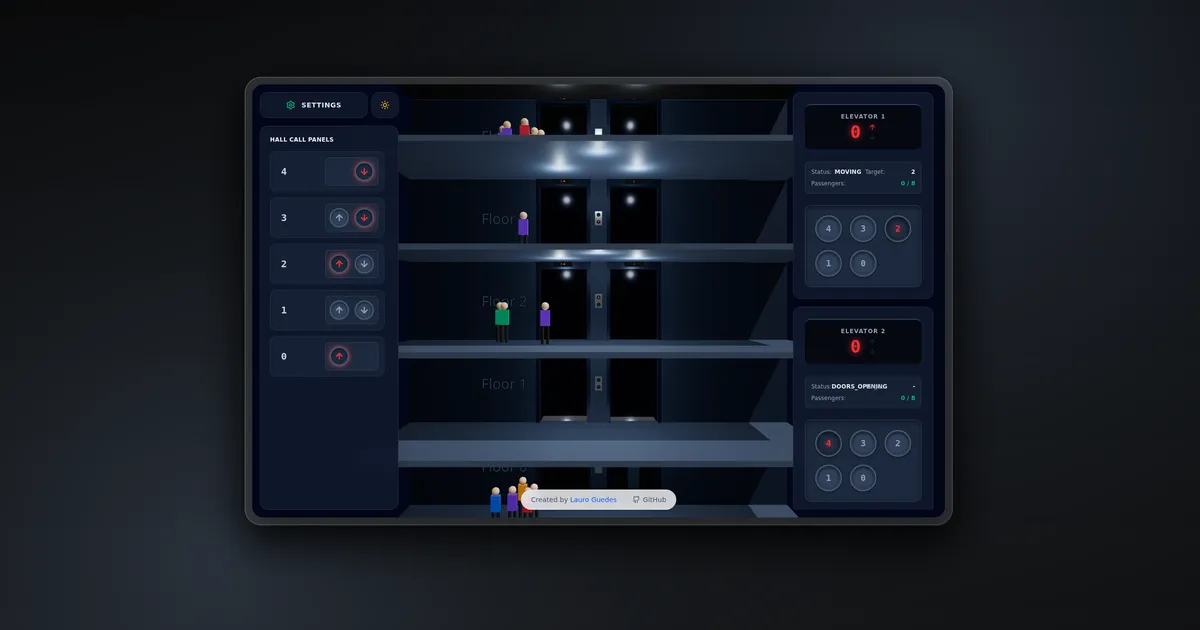
Lift Simulator 3D models two working elevators inside an interactive multi-floor building. Passengers appear on different floors, request an elevator, enter an available cabin, travel to a destination, and leave when the doors open.
The simulation combines a state-management problem with a visual one. The dispatch system must decide which elevator should answer a hall call, while the 3D scene must keep cabins, doors, floor indicators, passengers, control panels, and audio synchronized with that decision.
The default building has five floors and two elevators. A settings drawer can change the building to between two and twenty floors, adjust cabin capacity, create a specific passenger journey, or generate a larger random scenario. The scene updates without rebuilding the application or changing route-level configuration.
Simulation controls
The interface places the 3D building between two control surfaces.
The hall-call panel on the left contains up and down controls for every valid floor. Active calls glow red until an elevator reaches that floor and opens its doors. The settings button opens a drawer with controls for building height, maximum cabin capacity, manual passenger creation, random scenario generation, and a complete simulation reset.
The right side contains one panel for each elevator. Every panel shows:
- current floor and direction;
- current state and target floor;
- passenger count against capacity;
- internal destination buttons for every floor.
These panels are not a visual mockup. They write into the same Zustand store used by the 3D scene. Selecting a floor updates the cabin queue, and a hall call enters the dispatch process immediately.
The camera uses orbit controls, so the user can rotate and inspect the building while the simulation continues.
Tech stack
Lift Simulator uses React 19 and TypeScript with Vite 6. The 3D scene is built with Three.js through React Three Fiber and helpers from Drei.
Zustand owns elevators, hall calls, passengers, building configuration, and theme state. GSAP animates cabin movement, doors, passengers entering and exiting, and other timed transitions. Tailwind CSS 4 styles the control overlay, configuration drawer, status displays, and light and dark modes.
The Web Audio API generates the elevator ding and sliding-door noise at runtime. No audio files are required.
Global simulation state
store.ts defines the domain model and exposes the actions used by both the 3D scene and the interface.
Each elevator tracks:
interface Elevator {
  id: number;
  currentFloor: number;
  targetFloor: number | null;
  status: ElevatorStatus;
  queue: number[];
  direction: 'UP' | 'DOWN' | null;
  passengers: number;
}
The elevator states are IDLE, MOVING, DOORS_OPENING, DOORS_OPEN, and DOORS_CLOSING. Passengers move through their own lifecycle: WAITING, ENTERING, IN_ELEVATOR, and EXITING.
Keeping those state machines in one store makes transitions observable from every layer. A passenger changing to ENTERING changes what the Three.js scene renders. An elevator changing to MOVING updates its status panel and starts the cabin animation. A completed exit removes the passenger from the store and from the scene.
The store also guards configuration changes. Reducing the floor count clamps elevator positions, removes invalid queue entries and hall calls, and filters passengers whose journeys no longer fit the building.
Hall calls and dispatching
A hall call contains a floor and direction. Duplicate calls are ignored, which prevents repeated button presses from adding identical work.
The assignment logic evaluates both elevators. It prefers the nearest idle elevator. An elevator already moving can accept the call when it is traveling in the requested direction and has not yet passed the caller’s floor.
This is a practical variation of collective elevator control rather than a full traffic-optimization system. It captures the main behavior users expect:
- an idle nearby cabin should answer first;
- an elevator moving toward a compatible call can collect it on the way;
- a moving elevator should not reverse for a request it has already passed.
When an elevator becomes idle with queued floors, it chooses the closest destination. The movement direction is derived from the target relative to its current floor.
The call is removed only when the assigned elevator arrives and reaches DOORS_OPEN. That keeps the hall indicator active throughout the journey instead of clearing it as soon as an assignment is made.
Elevator state machine
The Elevator component reacts to store transitions and advances the cabin through its operating cycle.
In MOVING, the target floor is converted into a Y position using a constant floor height. Duration is based on travel distance, so a longer trip takes proportionally more time. GSAP moves the cabin with an eased animation while useFrame derives the nearest visible floor and keeps the store’s current-floor display synchronized.
At the destination, the simulator waits, plays a synthesized ding, and moves to DOORS_OPENING. Cabin doors and corresponding floor doors animate apart together. When opening completes, the state changes to DOORS_OPEN and the hall call is cleared.
During the open state, passengers whose target matches the floor begin exiting. Waiting passengers board until the cabin reaches its configured capacity. Boarding passengers add their destination to the elevator queue.
After a short dwell time, the elevator enters DOORS_CLOSING. Both door sets close, the completed floor is removed from the queue, and the cabin returns to IDLE, ready to choose its next destination.
Passenger lifecycle
A passenger is created with a start floor, target floor, color, waiting position, and eventual position inside the cabin. Manual creation uses the values from the settings drawer, while the random scenario generator creates valid journeys and staggers their arrival by 200 milliseconds.
A waiting passenger appears in the hallway at the start floor and automatically creates an up or down hall call. Once a cabin opens at that floor and has space, the passenger receives an elevator ID and changes to ENTERING.
GSAP moves the passenger model from the hall into its assigned cabin. The passenger then becomes IN_ELEVATOR and travels as a child of the moving cabin group. At the target floor, the state changes to EXITING, another animation moves the person away from the doors, and the passenger is removed after leaving the scene.
The model is intentionally simple: cylinders form the legs, a box forms the torso, and a sphere forms the head. Random clothing colors and positions make larger scenarios easier to read without requiring external 3D character assets.
Procedural building scene
Building.tsx constructs the complete environment from the selected floor count.
Every floor includes slabs, front walls, two elevator openings, door frames, floor labels, directional call indicators, and cabin displays. The building also includes shaft backgrounds, a roof, a ground base, and theme-dependent materials and lighting.
The two cabins use physical materials for glass bodies and doors. Cabin lights respond to theme and operating state, while floor displays show each elevator’s current floor and movement direction. The scene adds ambient and directional lighting, high-resolution shadows, and extra hallway lights in dark mode.
The perspective camera starts at a height and distance calculated from the current building size. Moving from five floors to twenty therefore changes the camera framing along with the generated geometry.
Audio without media files
The simulator creates its sounds with the Web Audio API.
The arrival ding is a sine oscillator at a fixed pitch with a short gain envelope. Door movement uses generated white noise passed through a low-pass filter, then fades the volume in and out over the same one-second duration as the door animation.
A singleton audio context is reused across events. If the browser suspends it under autoplay rules, an interaction resumes the context before playback.
This keeps the experience self-contained and avoids downloading audio assets for two short interface sounds.
Theme and interaction design
The scene and control panels share one theme value in Zustand. Switching themes changes the page background, panel colors, text, building materials, glass doors, shaft colors, floor lighting, and cabin illumination.
The overlay remains interactive while the Three.js canvas continues rendering below it. Pointer events are enabled only on the control surfaces, leaving the rest of the viewport available for orbit controls.
The configuration drawer uses a backdrop and slides from the left. Number controls constrain values before updating the store, so the user cannot create a building or capacity outside the supported range. Reset restores the two default elevators and clears calls and passengers.
Validation and deployment
The project includes a TypeScript validation command and a Vite production build:
npm ci
npm run lint
npm run build
npm run lint executes tsc --noEmit, which validates the React and simulation types without writing output. The production build compiles the static application for deployment on Vercel.
The repository does not define a dedicated automated test suite. Its current deterministic checks are TypeScript validation and the Vite production build. The live simulator is available at lift-simulator-3d.vercel.app.
The generated JavaScript bundle is relatively large because Three.js, React Three Fiber, Drei, GSAP, and the interface code ship together. Vite reports the main chunk above its default 500 KB warning threshold, making code splitting a clear optimization opportunity if the project grows.
Challenges
The hardest part was coordinating long-running visual transitions with application state. Cabin movement, door movement, boarding, exiting, queue updates, capacity, hall indicators, and audio all represent one logical elevator cycle. Advancing state too early would make the interface disagree with the scene; advancing it too late would leave the system idle after an animation had finished.
The dispatch problem also required a useful boundary between realism and complexity. The current algorithm understands distance, idle cabins, direction, and whether a moving elevator has passed a call. It does not attempt predictive scheduling or globally optimal wait times, which keeps the behavior understandable while still producing believable traffic.
Dynamic building height affects geometry, queues, passengers, camera placement, and controls at the same time. The store removes invalid work when floors are reduced, while the scene and UI derive their repeated elements from the same numFloors value.
Rendering transparent elevator materials, dynamic lights, shadows, multiple passengers, text labels, and a large UI overlay also has a real browser cost. The current project favors visual clarity and experimentation over aggressive bundle or render optimization.
Conclusion
Lift Simulator 3D is a compact example of combining an algorithmic system with a live visual model. Zustand defines what the elevators and passengers are doing, React Three Fiber turns that state into a building, and GSAP controls how each transition unfolds over time.
The result is more than an animated building. Hall calls, cabin destinations, capacity, passenger journeys, doors, displays, and audio all participate in the same simulation loop and can be inspected through a working control interface.