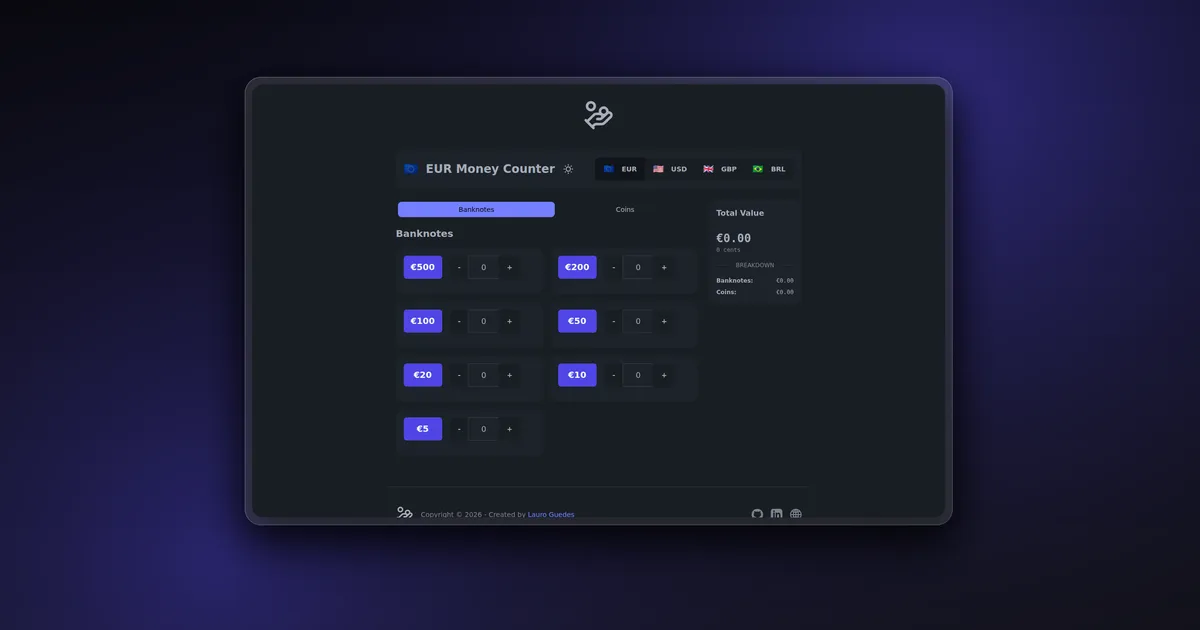
Coin Counter is a browser-based tool for adding up physical cash without repeatedly entering values into a calculator. The user chooses a currency, records how many coins and banknotes they have, and sees the total update immediately.
I built it for a practical counting workflow: empty a piggy bank, cash drawer, or collection onto a table, then move through each denomination one at a time. The interface supports EUR, USD, GBP, and BRL, with the denominations, symbols, flags, and formatting rules defined for each currency.
The first version counted coins. A later update added banknotes, separated both groups into tabs, and introduced a breakdown so the user can see how much of the total comes from notes and how much comes from coins.
Product flow
The application opens with EUR selected and the Banknotes tab active. Each denomination has decrement and increment controls around a numeric input, so quantities can be adjusted with buttons or typed directly.
When a quantity is greater than zero, the card displays the calculated value for that denomination and exposes an individual reset action. The total card remains visible beside the counting grid on large screens and reports three values:
- the combined cash total;
- the subtotal for banknotes;
- the subtotal for coins.
The total can be copied to the clipboard, and one reset action clears every denomination in the selected currency. Changing currencies also clears the current counts instead of carrying values into a different monetary system.
Tech stack
Coin Counter is built with Vue 3 and the Composition API. TypeScript defines the currency, coin, banknote, and component event contracts. Vite 5 provides the development server and production build.
The interface uses Tailwind CSS 3 and DaisyUI 4 for responsive layout, cards, joined controls, tabs, buttons, and the light and dark themes. Vue transitions handle tab and card state changes, while GSAP animates the numeric total.
The application is completely client-side. It has no account system, database, or API dependency, and counting data stays in the active browser session.
Currency model
The core data lives in the useCurrency composable. Each CurrencyConfig contains a code, symbol, display name, flag, coin list, and banknote list. EUR, USD, GBP, and BRL each define their own valid denominations.
Coins and banknotes share the same MoneyItem structure:
interface MoneyItem {
  value: number;
  label: string;
  count: number;
  displayValue: number;
}
Values are stored in the smallest currency unit. One euro is 100, five British pounds is 500, and one Brazilian real is 100. The total calculation therefore uses integer arithmetic rather than adding decimal currency values.
This avoids common floating-point errors such as a sequence of decimal additions producing 9.999999 instead of 10.00. Formatting happens only at the display boundary through Intl.NumberFormat, using the selected ISO currency code and the browser’s locale.
Reactive calculations
Vue computed properties derive the totals directly from denomination counts.
coinsTotal reduces the active coin list. banknotesTotal does the same for banknotes, and totalValue combines both results. Components do not maintain a separate total that could drift out of sync with the inputs.
The same approach calculates the value shown inside an individual denomination card:
const formattedValue = computed(() => {
  return props.formatCurrency(props.coin.value * props.coin.count);
});
A currency change replaces the active coin and banknote arrays with the selected configuration and then resets their counts. This keeps the selection, controls, formatted labels, subtotals, and total card synchronized through one composable.
Component architecture
CoinCounter.vue coordinates the screen. It owns the active tab, consumes useCurrency, and connects the currency selector, denomination cards, total display, logo, theme switch, and footer.
The main UI is split into focused components:
CurrencySelectorrenders the four currency choices from configuration instead of hardcoding separate controls.BanknoteInputpresents rectangular denomination markers and emits increment, decrement, and reset events.CoinInputuses the same event contract with circular denomination markers.CoinValueDisplayshows the calculated value and per-item reset action only when a count exists.TotalDisplaypresents the total, the coin and banknote breakdown, clipboard action, and global reset.ThemeSwitchpersists the selected DaisyUI theme inlocalStorage.
The coin and banknote components intentionally share behavior while keeping their visual treatment independent. That made it possible to add banknote support without turning one component into a long set of conditional classes.
Interface details
Each currency has a recognizable color family. EUR uses blue and indigo, USD uses red and rose, GBP uses purple and violet, and BRL uses green and emerald. Coins appear as circles, while banknotes use wider rectangular markers.
The counting grid changes from one column on small screens to two columns for the denomination cards. On large screens, it shares a four-column layout with a sticky total card. The direct number fields use a 16-pixel font to prevent automatic zoom on iOS and hide browser spinner controls because the interface already provides explicit increment and decrement buttons.
Tab content uses Vue’s transition system with mode="out-in", which prevents both panels from occupying the layout during a switch. Denomination cards receive staggered animation delays, while the total card scales and fades when the selected currency changes.
The theme switch reads the saved preference when the component mounts and writes the active data-theme value to the document root. DaisyUI then applies the corresponding light or dark component theme across the application.
Total animation and clipboard support
TotalDisplay watches the reactive total and animates an intermediate cent value with GSAP. The duration scales with the size of the change but is capped at one second, so adding a high-value banknote does not produce an excessively long animation.
The formatted total remains the authoritative value shown to the user. The animated cent count acts as secondary feedback and rounds each frame to a whole integer.
The clipboard action writes the already formatted total, such as €755.00, instead of copying an unformatted integer. A temporary success icon confirms the operation and returns to its normal state after two seconds.
Validation and deployment
The production command runs vue-tsc -b before Vite builds the static bundle. Type errors therefore stop the build instead of reaching deployment.
npm ci
npm run build
The output is a small static application that can be hosted without a server runtime. The public demo is deployed at coin-counter.lauroguedes.dev.
The repository does not currently define a dedicated automated test or lint command. Its available validation path is TypeScript project checking through vue-tsc followed by the Vite production build.
Challenges
Adding multiple currencies required more than changing the symbol beside a number. Each currency has its own set of denominations, display labels, flag, ISO code, and formatting behavior. Keeping those details in typed configuration made the controls data-driven and kept currency-specific rules out of the main screen component.
Banknote support introduced another layer of totals and controls. The useful distinction was not only visual. Users need a combined total and a clear breakdown without entering the same value twice or moving between separate calculators. Separate computed subtotals solved that while preserving one source of truth.
The interface also had to work well for repetitive input. Direct number entry is faster for a large quantity, while plus and minus buttons are more convenient when counting items one by one. Supporting both input styles with individual and global reset actions makes the tool practical across desktop and mobile.
Conclusion
Coin Counter is a small project, but it demonstrates a useful frontend pattern: represent domain rules as typed configuration, keep calculations derived from reactive state, and reserve components for the interaction and presentation layers.
The final application handles four currencies, coins and banknotes, localized totals, theme persistence, responsive counting controls, and a fully client-side deployment without adding backend complexity the problem does not need.