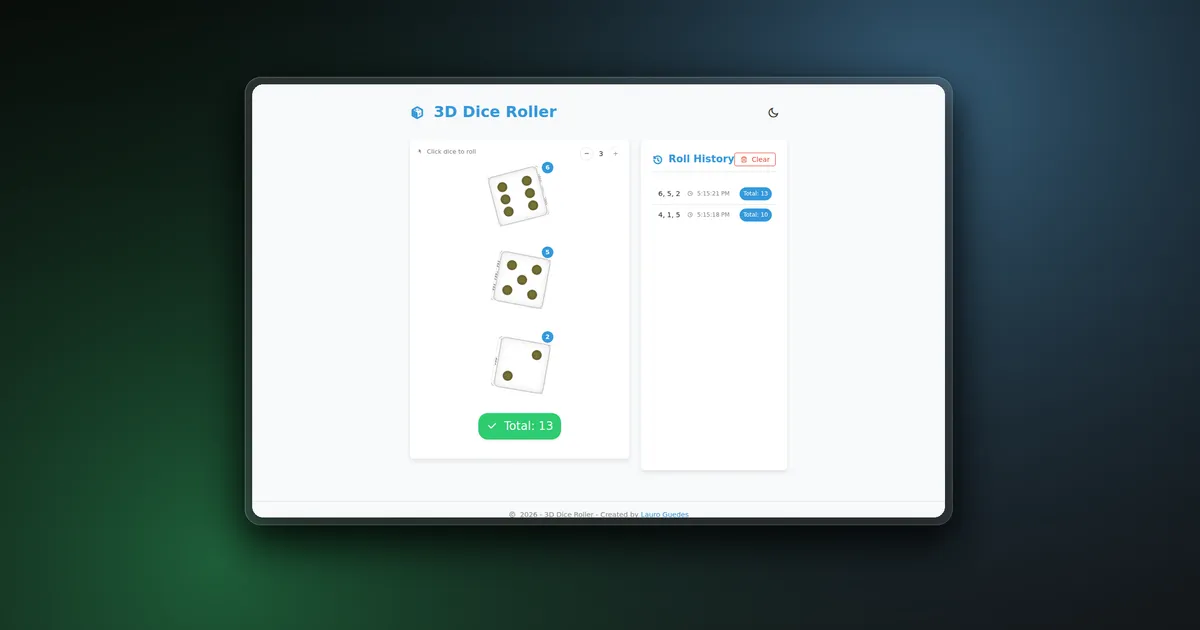
3D Dice Roller is a browser-based dice simulator built without a 3D rendering library or physics engine. Each die is a real HTML element whose six faces are positioned in three-dimensional space with CSS transforms. Vue coordinates the application state, while GSAP turns a generated result into a multi-stage rolling animation.
The application can roll one, two, or three dice at once. A completed roll records the individual values, combined total, and timestamp in a history panel. The interface also supports light and dark themes and adapts from a two-column desktop layout to a stacked mobile view.
The project started as an experiment in making a familiar physical object feel convincing with ordinary web platform features. The interesting part was not generating a number from one to six. It was making the visible cube finish on the face that corresponds to that result while still allowing enough random movement to avoid a repeated, mechanical-looking animation.
Product flow
The initial screen shows one die with a random face and an empty history panel. Controls in the dice card let the user select between one and three dice. The count cannot change while a roll is in progress, which keeps the number of expected animation callbacks aligned with the current dice collection.
Clicking any die starts a roll for the complete set. New values are generated first, then each Dice component receives its target value and an animation-complete callback. The parent waits until every visible die has finished before it:
- calculates the combined total;
- inserts the roll at the top of the history;
- re-enables the controls;
- briefly shows the completed state.
When multiple dice are active, each die receives a small value badge and the card displays the combined total. The history keeps individual values, total, and local time together, and can be cleared without resetting the current dice.
Tech stack
The application uses Vue 3 with the Composition API and TypeScript for state, props, events, and animation contracts. GSAP controls the rolling timelines, dot pulses, and final settling movement. Vite 5 provides development and production tooling.
The dice themselves use CSS perspective, transform-style: preserve-3d, and six absolutely positioned faces. The rest of the interface is custom CSS built around variables for colors, cards, borders, shadows, responsive layout, and theme switching. Remix Icon is loaded from a CDN for interface icons.
The result is a static client-side application. It does not need a backend, database, WebGL context, Three.js scene, or canvas renderer.
Building a die with CSS
Dice.vue contains six square face elements inside a 100 by 100 pixel cube. The parent establishes perspective, and the die keeps its children in 3D space:
.dice-wrapper {
  width: 100px;
  height: 100px;
  perspective: 1000px;
}

.dice {
  width: 100%;
  height: 100%;
  position: relative;
  transform-style: preserve-3d;
}
Each face is moved 50 pixels from the center, half the cube width. The front face moves along the positive Z axis. The back rotates 180 degrees around Y, the side faces rotate 90 degrees around Y, and the top and bottom rotate around X.
.front  { transform: translateZ(50px); }
.back   { transform: rotateY(180deg) translateZ(50px); }
.right  { transform: rotateY(90deg) translateZ(50px); }
.left   { transform: rotateY(-90deg) translateZ(50px); }
.top    { transform: rotateX(90deg) translateZ(50px); }
.bottom { transform: rotateX(-90deg) translateZ(50px); }
Pips are ordinary circular elements placed with percentage-based positions. Every face keeps its own pip arrangement, which makes the rendered cube independent from text or image assets.
Mapping values to visible faces
A random result is useful only if the animation finishes with the correct face toward the viewer. The component keeps an explicit rotation map for values one through six:
const faceRotations = {
  1: { x: 0, y: 0, z: 0 },
  2: { x: 0, y: -90, z: 0 },
  3: { x: -90, y: 0, z: 0 },
  4: { x: 90, y: 0, z: 0 },
  5: { x: 0, y: 90, z: 0 },
  6: { x: 0, y: 180, z: 0 },
};
These rotations match the CSS placement of each face. The component also exposes a face-calibration helper that cycles through all six values, which is useful when changing cube transforms or pip layouts.
A small random tilt is added to the target rotation, but the code enforces a minimum amount of tilt on at least one axis. Without that constraint, some rolls would end in the same perfectly aligned presentation and make the movement feel less physical.
GSAP rolling sequence
The roll is a controlled animation rather than a simulated rigid-body system. It uses random rotation values and easing to suggest momentum, deceleration, and a final settling motion.
The timeline has three main stages:
- Compress the die slightly to create anticipation.
- Rotate it through at least 720 degrees on the X and Y axes while restoring its scale.
- Move from the large rotation into the calibrated target face plus its random tilt.
After the main timeline reaches the target, a short secondary tween removes a fraction of the tilt. That final correction produces the small settling movement normally associated with an object losing momentum.
Existing GSAP tweens are killed before a new roll begins, and the die ignores clicks while its animation is active. The parent also blocks repeated rolls and count changes until every die reports completion.
Once the target face is visible, its pips pulse between dark and yellow before returning to their normal color. This gives the result a clear visual confirmation without placing another large label over the cube.
Coordinating multiple dice
App.vue owns the number of dice, their generated values, component references, history, rolling state, and total. The dice count is capped at three to preserve the layout and keep the animation readable.
When the count increases, a watcher appends initial random values. When it decreases, the values array is sliced to the requested length. Count controls are disabled during a roll, so the number of dice cannot change after the parent has started waiting for callbacks.
The roll method generates every result before starting the animations. Each child receives its corresponding value and increments a shared completion counter when its timeline finishes. History is updated only when that counter equals the number of active dice.
This callback barrier prevents a partial result from appearing while one die is still moving. It also keeps the total, badges, and history entry tied to the same generated values.
Roll history and derived totals
The combined total is a Vue computed property:
const totalValue = computed(() => {
  return diceValues.value.reduce((sum, value) => sum + value, 0);
});
A completed history item stores a copy of the values instead of retaining the reactive array reference. New records are inserted with unshift, so the latest result stays at the top of the panel.
The history layout displays the individual dice values, local timestamp, and total in one row. Its list scrolls after reaching a fixed height, which prevents a long session from expanding the complete page. On narrower screens, each item changes from three columns to a compact two-column arrangement.
The application does not persist history after a refresh. That matches the lightweight purpose of the tool and avoids introducing storage or account behavior for temporary rolls.
Theme and responsive behavior
The theme is initialized from prefers-color-scheme before the component mounts. The manual toggle adds or removes a dark-theme class on the document body, switching the CSS variables used for backgrounds, cards, text, borders, and shadows.
The selected theme is not written to local storage, so a new page load returns to the current system preference. This keeps the implementation small, though persistence would be a straightforward future extension.
The main layout is one column by default. At 900 pixels and above, it becomes a three-to-two ratio grid with the dice card beside the history panel. History rows also change their grid placement on small screens so timestamps and totals remain readable.
Validation and deployment
The production command runs the Vue TypeScript project build before Vite creates the static bundle:
npm ci
npm run build
The build script uses vue-tsc -b && vite build, so type errors stop production output. The repository has no dedicated automated test or lint command; its available deterministic validation is the TypeScript project check and Vite production build.
The generated site is static and is deployed at 3d-dice-roller-rosy.vercel.app.
Challenges
The main technical challenge was keeping the generated value and visible face synchronized. CSS defines where each face exists, while TypeScript defines the rotations that bring those faces forward. A mismatch between those two representations would produce a convincing animation with the wrong result.
Animation coordination became more important after adding multiple dice. Each die owns its GSAP timeline, but the application must treat the group as one roll. Waiting for every completion callback before writing history keeps the UI state consistent without centralizing all animations in the parent.
Randomness also needed boundaries. Completely random final rotations can hide the target face or leave the die in an awkward orientation. The implementation separates randomness into two parts: the result determines the calibrated base rotation, while a constrained tilt changes only the presentation.
The roller uses Math.random(), which is appropriate for a casual visual tool but is not intended for cryptographic, gambling, or verifiable game outcomes. The project focuses on interaction and animation rather than security-grade randomness.
Conclusion
3D Dice Roller demonstrates how far CSS transforms can go before a project needs WebGL. The browser handles the cube faces and perspective, GSAP handles motion, and Vue coordinates values, totals, history, and concurrent completion.
The final application remains small and deploys as static files, while still delivering interactive 3D objects, multi-dice state, responsive history, and theme-aware presentation.